




Open source · AGPL-3.0

The Ultimate Datacenter Management Solution for Proxmox VE & XCP-ng without any price tag

The multi-hypervisor control plane your operations team has been asking for. Manage Proxmox VE clusters and XCP-ng pools side by side — with audit-ready compliance, ESXi migration, FinOps and DR drills. 100 % free, forever. No paid tier, no asterisk.

No license fees Self-hosted No telemetry 7 languages CMMC · NIS2 · ISO 27001 · BSI

Want to evaluate before you install? Browse the full documentation at docs.pegaprox.com  

Trusted by organizations in
Healthcare Finance Defense Government Law Enforcement

PegaProx is the only fully free, open-source management platform built for Proxmox VE that delivers enterprise-grade features — intelligent load balancing, cross-cluster live migrations, and SSO — without paywalls, lock-in, or corporate overhead.

Backed by
netwolk GmbH Expertize Netzware Occentus Network SocialFurr
€0

Fully free. No paid tier. No catch.

PegaProx is open source under AGPL-3.0. Run it on a 2-node homelab, run it on a 100-host enterprise cluster — same software, same features, same price. Forever. Made possible by our sponsors and our Open Collective backers.

Aikido Security Audit Report

Independently audited every day. Public report.

PegaProx is open source and open about its security posture. Two independent scanners — Aikido and CodeAnt AI — sweep the entire codebase every single day. The Aikido report is public — no NDA, no sales call — click the badge. See what's covered →

Two interfaces, one platform

Pick the layout that fits your team.

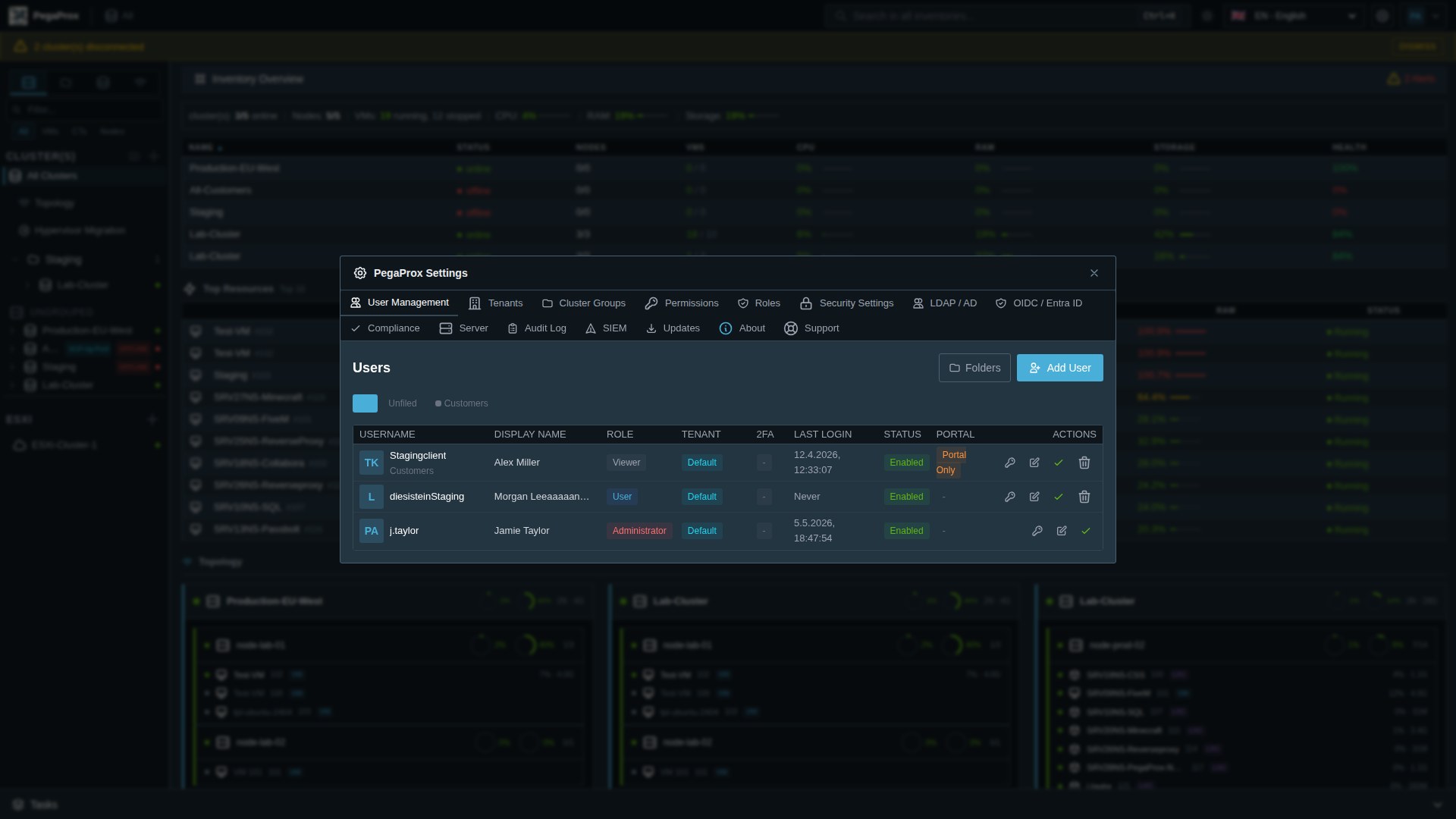
PegaProx ships with two first-class interfaces. Switch with one click — the underlying functionality, RBAC and audit log are identical.

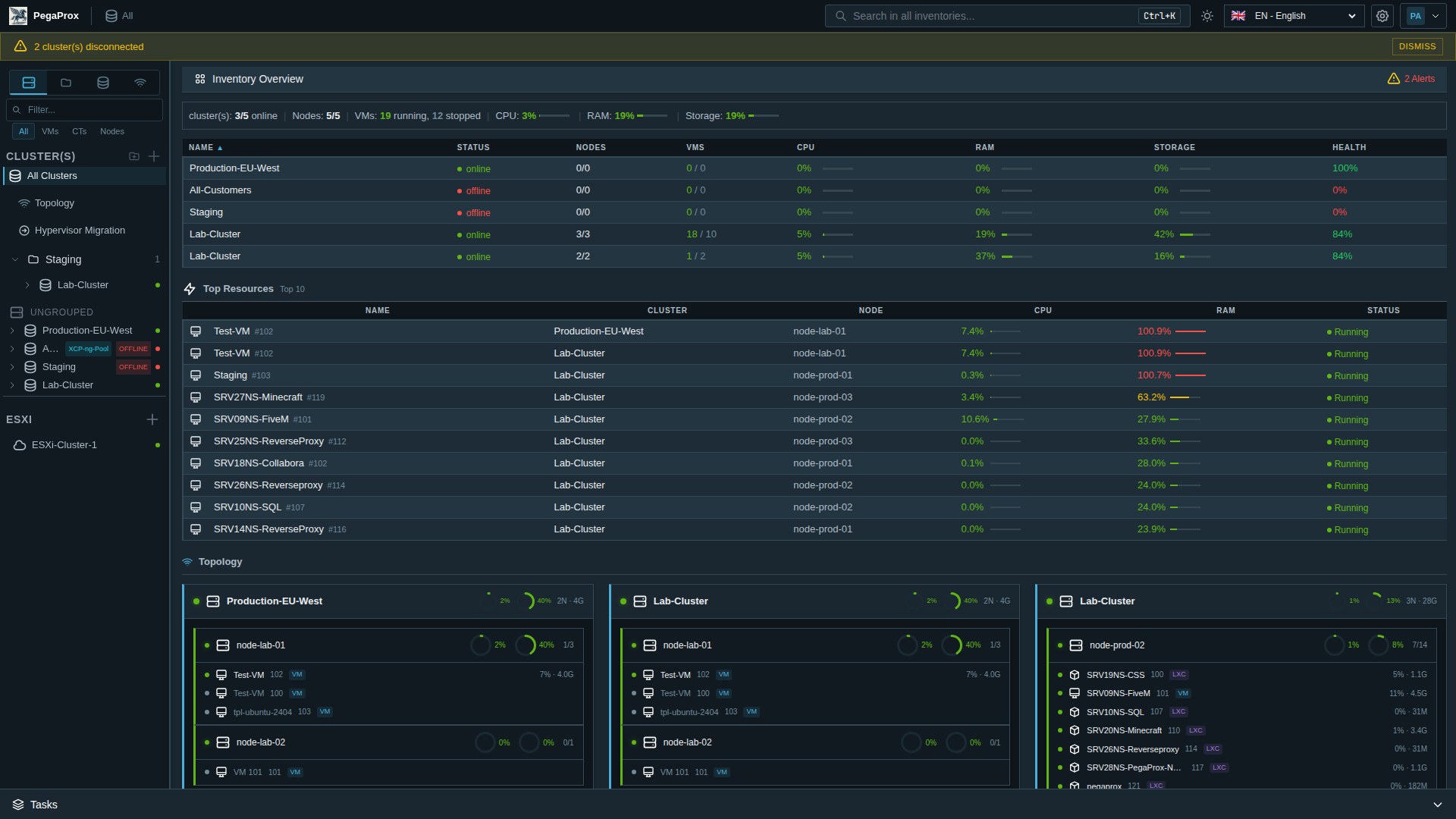
PegaProx Corporate layout — dark theme, tree sidebar, dense tables
Corporate

Built for ops teams used to vCenter

Tree-based inventory sidebar, dense tables, keyboard navigation. Designed so administrators migrating from VMware feel at home from minute one. Light variant available with one click.

  • Hierarchical tree: Cluster → Node → VM / CT
  • Sortable, sticky-header tables
  • Right-click context menus everywhere
  • Keyboard-first navigation
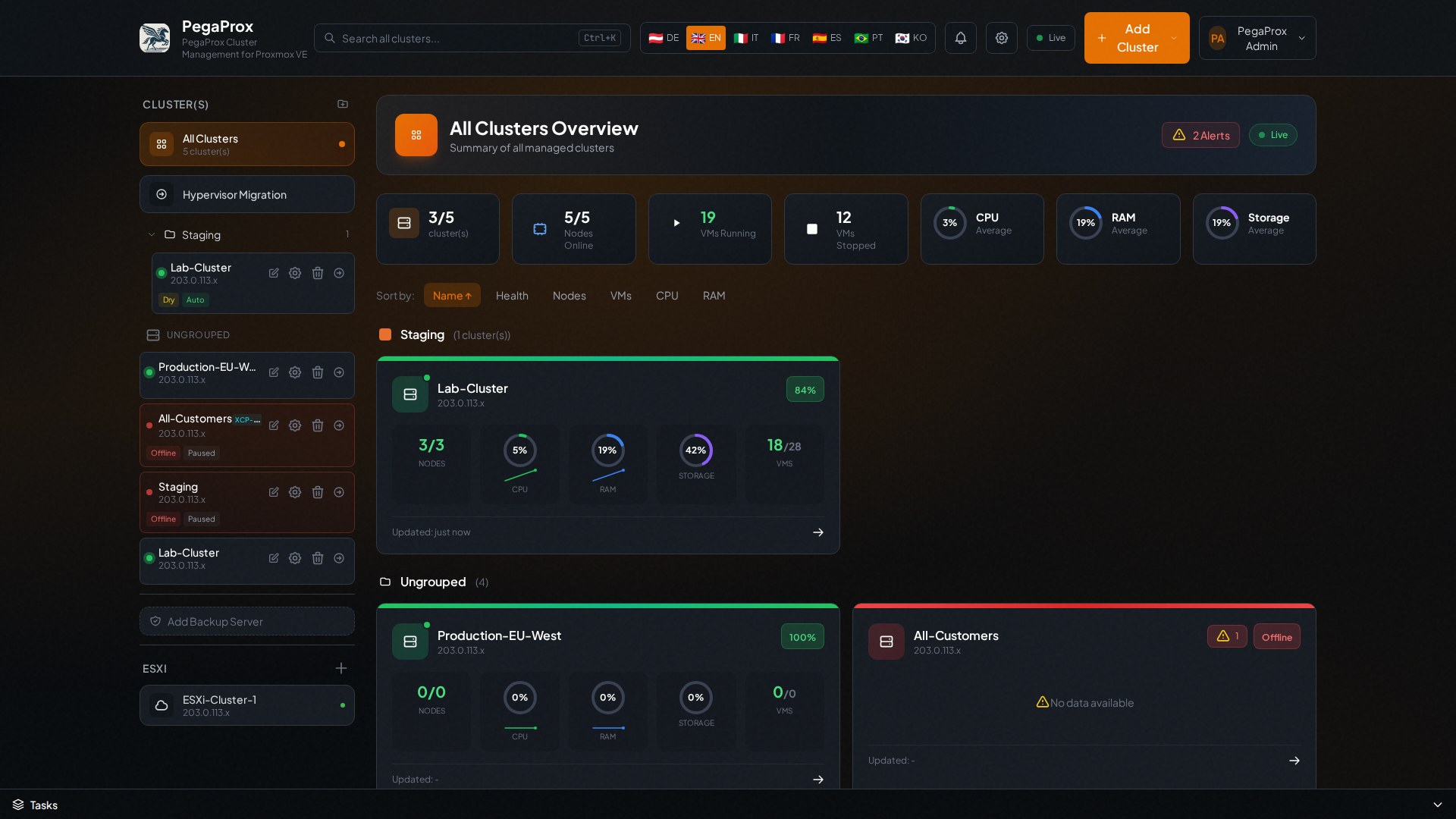
PegaProx Modern layout — dark theme, cards and gauges
Modern

Built for clarity at a glance

Cards, gauges, big numbers and a relaxed grid. Perfect for smaller teams, homelabs, or as the dashboard you mount on the NOC wall.

  • Live resource gauges via SSE
  • Generous whitespace, easy on the eyes
  • 17 themes incl. Dracula, Nord, Solarized
  • PWA — installable as a native app
See it in motion

An independent walkthrough.

Five minutes of someone outside our team installing PegaProx, connecting clusters and clicking through the corporate UI. Honest review, captions available.

2GuysTek · This Open Source Project Just Killed the Proxmox GUI!
Featured video

Watch PegaProx in action.

2GuysTek runs through the install path, the multi-cluster sidebar, the migration wizard and the corporate UI. The kind of independent demo that's worth more than any sales deck.

Huge thanks to @2GuysTek for putting this together.
Full walkthrough English Captions
What practitioners say

Independent reviews from the field.

No paid placements, no influencer deals — just unsolicited posts from people who actually run multi-cluster Proxmox and XCP-ng environments and decided to share their take.

We are currently managing 21 clusters with 79 nodes — this is exactly where a centralized approach starts to make a real difference.

Managing multiple Proxmox clusters used to be… messy. With PegaProx, that changed completely. Central overview across all clusters, clear status visibility for all nodes, structured maintenance workflows, rolling updates without downtime chaos. Instead of jumping between nodes and clusters, everything is bundled into one clean interface. Especially in environments where availability matters, this is a big step forward — faster reactions, better control, less operational risk. And updates? No more manual node-by-node handling — just a controlled and structured rollout.
SP
Sascha Paintner
Industrial IT & Automation
LinkedIn · Read original post

We move from “I navigate my infrastructure” to “I pilot it.”

A unified view of all my infrastructure, real-time metrics, VM and container management from a single point — no more juggling between ten different interfaces. And it goes further than a dashboard: live VM migration between clusters, Ceph storage management, intelligent load balancing, affinity rules, automated updates and failover. On the security side: RBAC, 2FA, LDAP/OIDC integration, AES-256 credential encryption, built-in vulnerability scanning. The tool has potential. One to watch closely. (Translated from the original French post.)

HK
Hurkan Kalan
Cybersecurity GRC & Cyberdefense Engineer
LinkedIn · Read original post

A serious alternative for teams running multiple Proxmox clusters — without putting a Nutanix or oVirt budget on the table.

What it actually does: live cross-cluster migration with automatic resource checks, automated load balancing between nodes via ProxLB, SSO with LDAP/OIDC/Entra ID out of the box, CVE scanning and automated PVE host hardening, ESXi migration (a strong post-Broadcom argument), native Ceph management (pools, OSDs, cluster health), and HA supported in 2-node configurations — ideal for edge environments. Small team (3 devs), still in beta, and production maturity remains to be confirmed on high-density clusters. They also use AI in their workflow. Deployment is a single curl script on Debian. (Translated and condensed from the original French post.)

JD
Jonathan Deltombe
Cloud & infrastructure community · LinkedIn
LinkedIn · Read original post

All reviews are reproduced with author attribution and a link to the original source. Translations are our own and provided for accessibility — the linked original is authoritative. Share your experience on GitHub Discussions.

Coverage

What the community is saying

VirtualizationHowTo

Managing Multiple Proxmox Clusters Gets Messy When You Want Smarter Placement

An in-depth look at how PegaProx solves the challenge of managing multiple Proxmox VE clusters with intelligent workload placement.

Read article
VirtualizationHowTo

5 Proxmox Management Tools I Use in My Home Lab in 2026

PegaProx featured as one of the top Proxmox management tools for home lab enthusiasts in 2026.

Read article
gyptazy's Blog

PegaProx — A Real Datacenter Manager for Proxmox Clusters

Hands-on review covering multi-cluster management, ESXi migration, and the corporate UI mode.

Read article
credativ · DE

PegaProx bringt Enterprise Features in Proxmox VE basierte Virtualisierung

credativ's senior DevOps consultant gyptazy on how PegaProx closes the enterprise-feature gap in Proxmox VE — without licensing costs.

Read article
StarWind Software

PegaProx — Proxmox VE management and ESXi migration

StarWind's blog walks through PegaProx's multi-cluster control plane and how teams use it to migrate workloads off ESXi post-Broadcom.

Read article
GreenHoster · FR

Gestion Proxmox multi-sites simplifiée avec PegaProx

French managed-hosting provider on running multi-site Proxmox under a single pane of glass — security, monitoring, and live migration covered.

Read article
Blog Virtualizado · ES

Instalar PegaProx en Proxmox paso a paso

A Spanish-language step-by-step install walkthrough — from a fresh Proxmox host to PegaProx connected and operational.

Read article
vBlog.io · FR

PegaProx, je suis bluffé !

French reviewer compares PegaProx to vCenter — DRS-equivalent load balancing via ProxLB, granular RBAC, and multi-tenant capabilities.

Read article
A closer look

The features that earn the screen real estate.

A walk through the bits managers and auditors actually ask for.

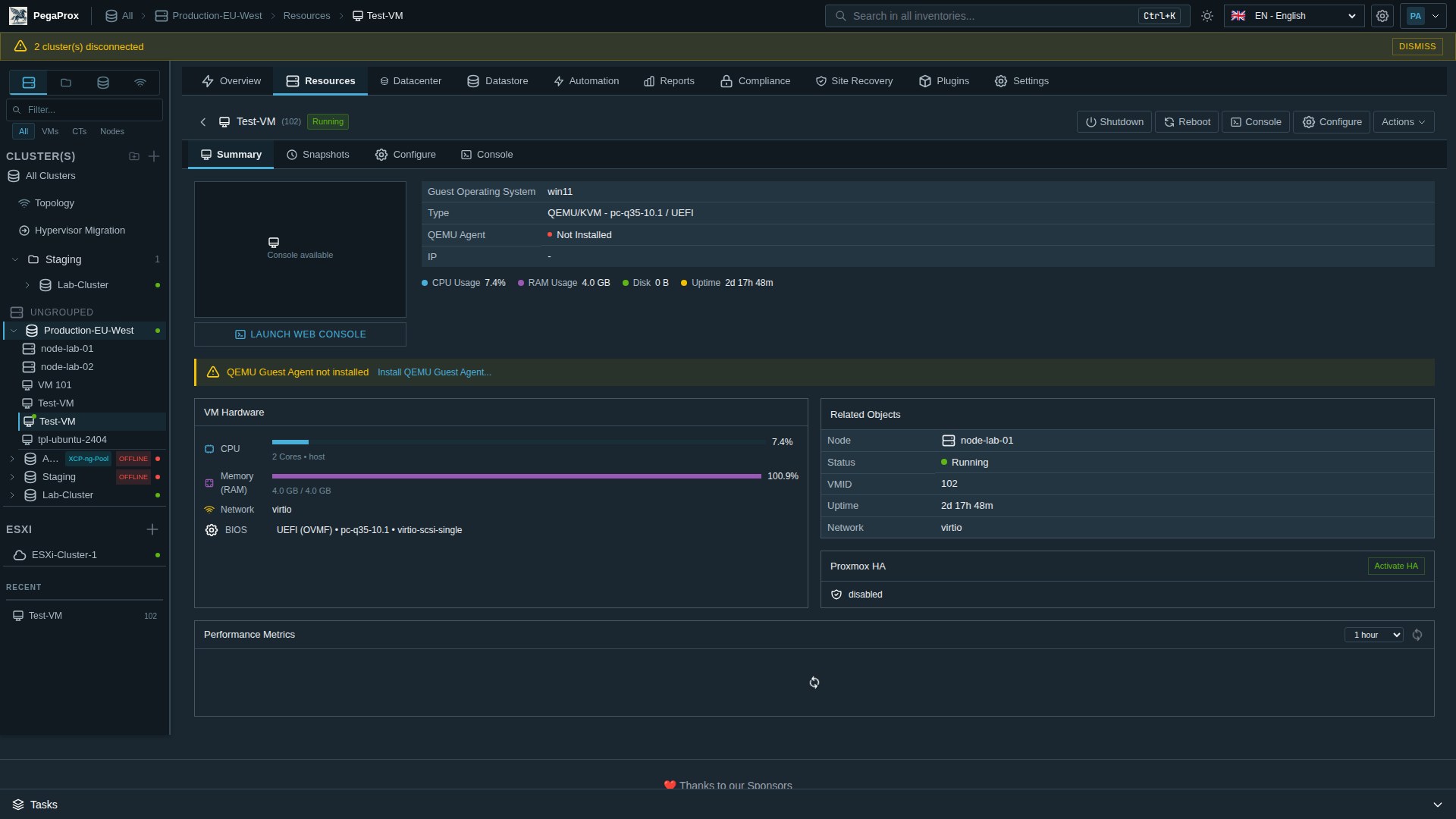
VM detail

Click any VM. Get the whole picture.

Power state, guest OS, agent status, CPU / RAM / disk usage, BIOS / firmware, network model, HA status, recent performance — and the action buttons (start, stop, reboot, console, configure) right where you'd expect them. Sub-tabs for Snapshots, Configure and the noVNC console.

  • Quick actions: shutdown · reboot · console · configure
  • Live CPU / RAM / disk gauges
  • Browser-based noVNC and xterm.js console
  • Per-VM RBAC + audit trail of who did what
VM detail showing Summary tab with hardware, status, power actions, related objects
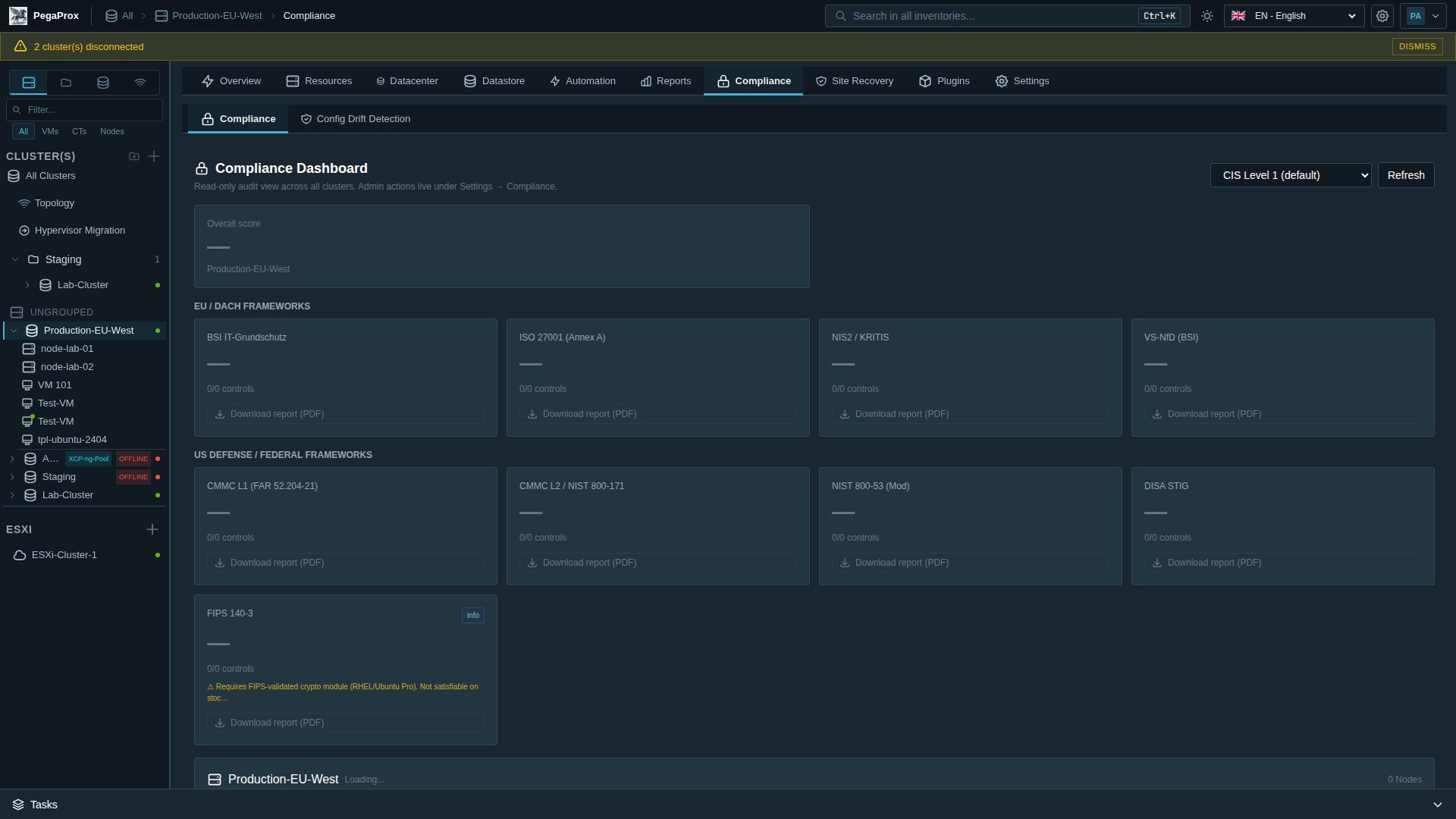
Compliance support

Evidence material for your audit binder.

A read-only dashboard that maps your cluster's hardening state against the controls of BSI IT-Grundschutz, ISO 27001, NIS2 / KRITIS, VS-NfD, CMMC L1/L2, NIST 800-53, DISA STIG and FIPS 140-3. Per-framework PDF, per-control evidence, no paid add-on. Designed to support your audit preparation — actual certification still depends on your processes, your auditor, and the rest of your environment.

  • Cluster-scoped — no fanout overhead
  • Hardening score per cluster
  • Transparent about what's not satisfiable on stock Proxmox
Compliance Dashboard showing BSI, ISO 27001, NIS2, CMMC, NIST 800-53, DISA STIG framework cards
Network topology

One graph. Every cluster. Every link.

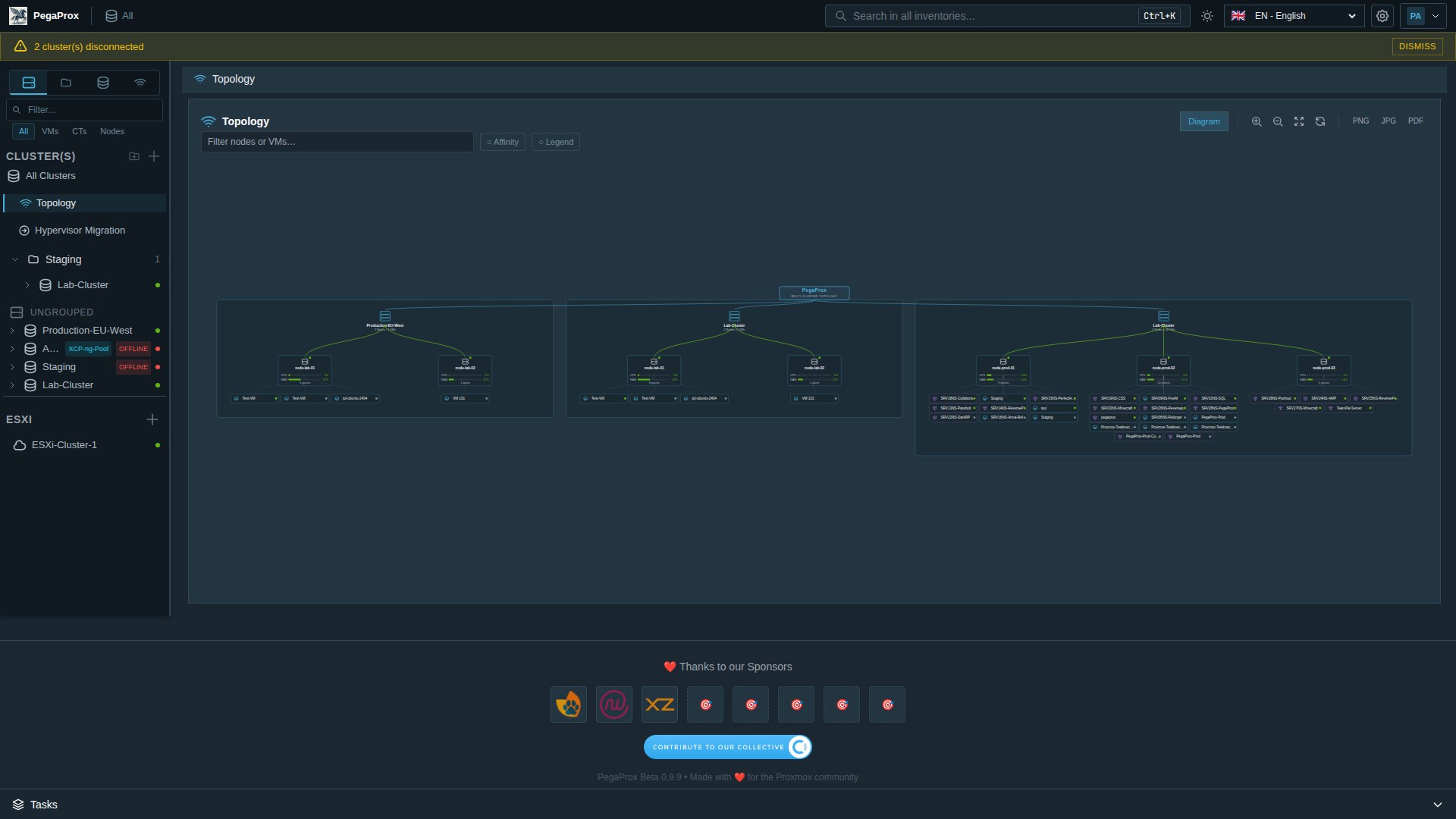
Interactive SVG topology that walks Cluster → Node → Bridge / Bond / SDN VNet → VM. Click a node to highlight its connections. Click an interface to see who's on it. The picture you wish you had during last quarter's outage.

  • Multi-cluster, single graph
  • PNG / JPG / PDF export for change tickets
  • Affinity overlay shows must-be-together / must-not-be-together pairs
Network Topology view showing multi-cluster nodes and VMs
FinOps

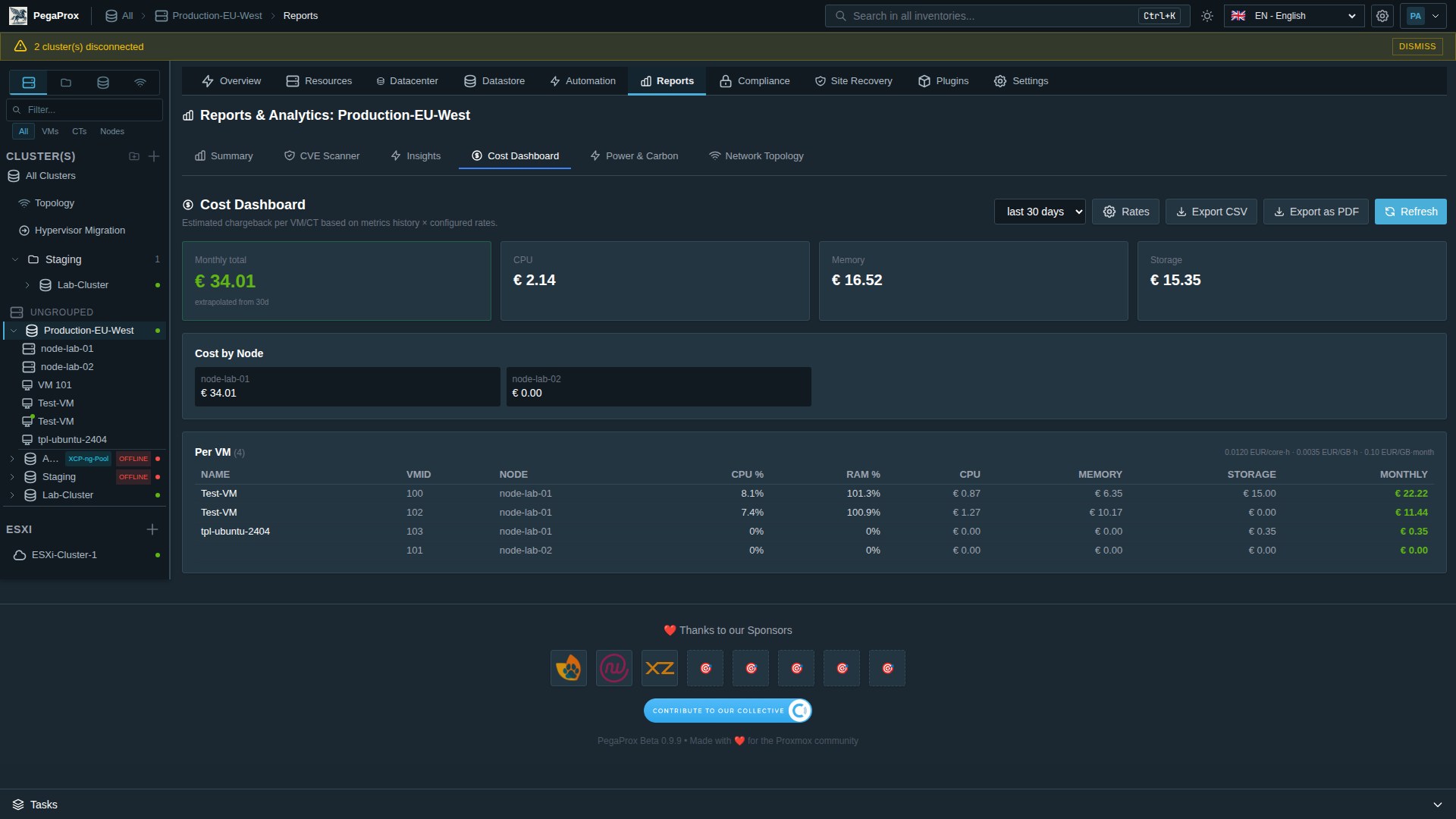
€ per VM, per node, per cluster — and the chart your CFO asked for.

Cost Dashboard turns real metrics history (CPU-h, RAM-GB-h, Storage-GB-month) into a chargeback view your finance team can use. Per-VM, per-node, per-tenant. Configurable rates per cluster. CSV + PDF export.

  • Currency-configurable, per-cluster rates
  • Top-spender table for the steering meeting
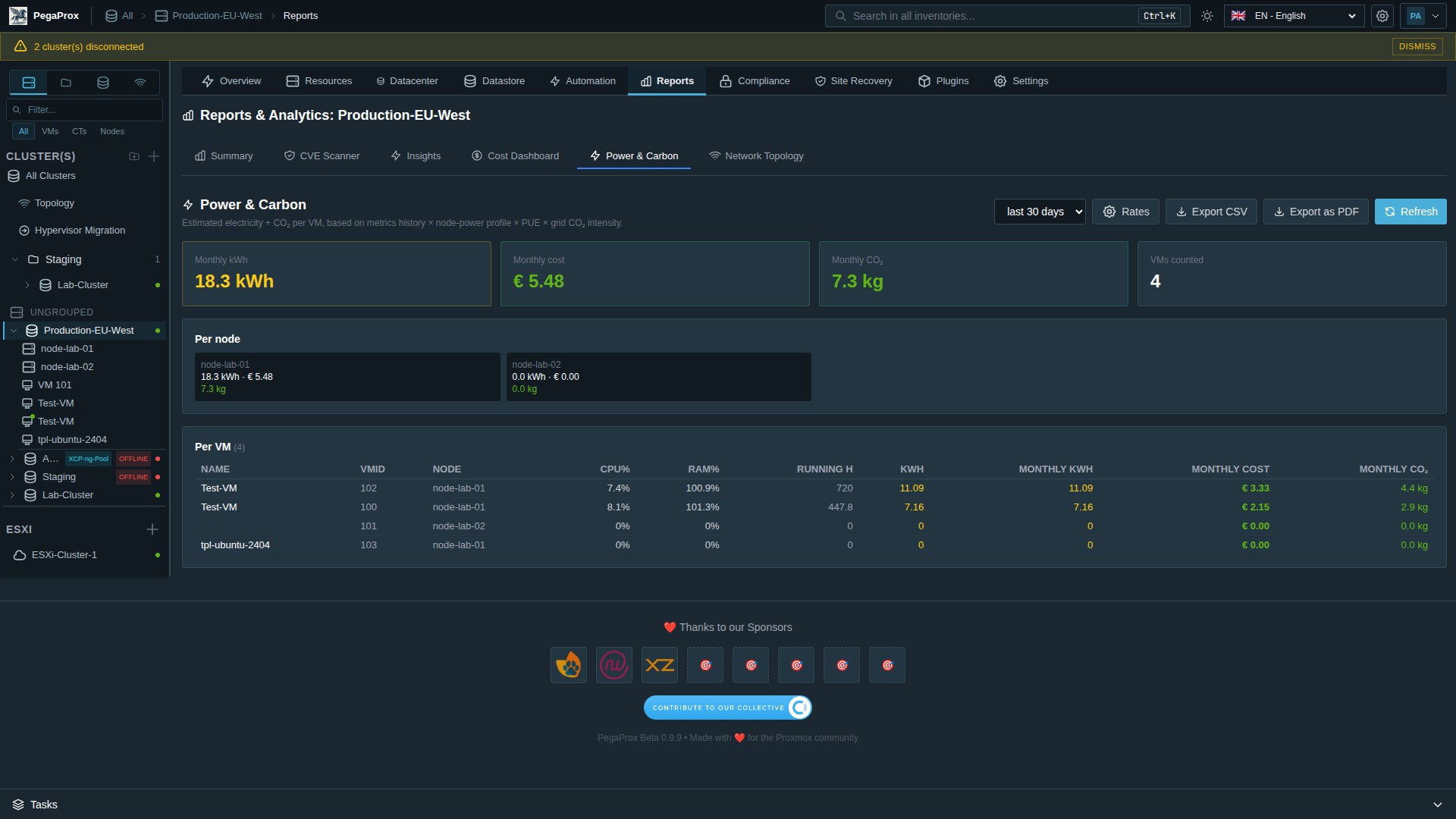
  • Pairs with Power & Carbon for €/kWh / kg CO₂ alongside
Cost Dashboard showing per-VM monthly cost, breakdown by node, tabular per-VM list
More highlights

A few more rooms in the house.

Six screens we get asked about most often. Click any to enlarge.

For decision makers

Six reasons IT leadership picks PegaProx.

Plain language, real outcomes. The kind of bullet points that survive a steering-committee slide.

Migrate from VMware in hours, not quarters

Built-in ESXi → Proxmox import wizard with near-zero downtime, VirtIO driver pre-staging for Windows guests, and end-to-end audit trail. Run it the same week the renewal letter arrives.

Compliance evidence, ready to print

Read-only Compliance Dashboard mapped against BSI Grundschutz, ISO 27001, NIS2, SOC 2, CMMC and DISA STIG controls. Hardening score per cluster. Per-framework PDF for your evidence binder.

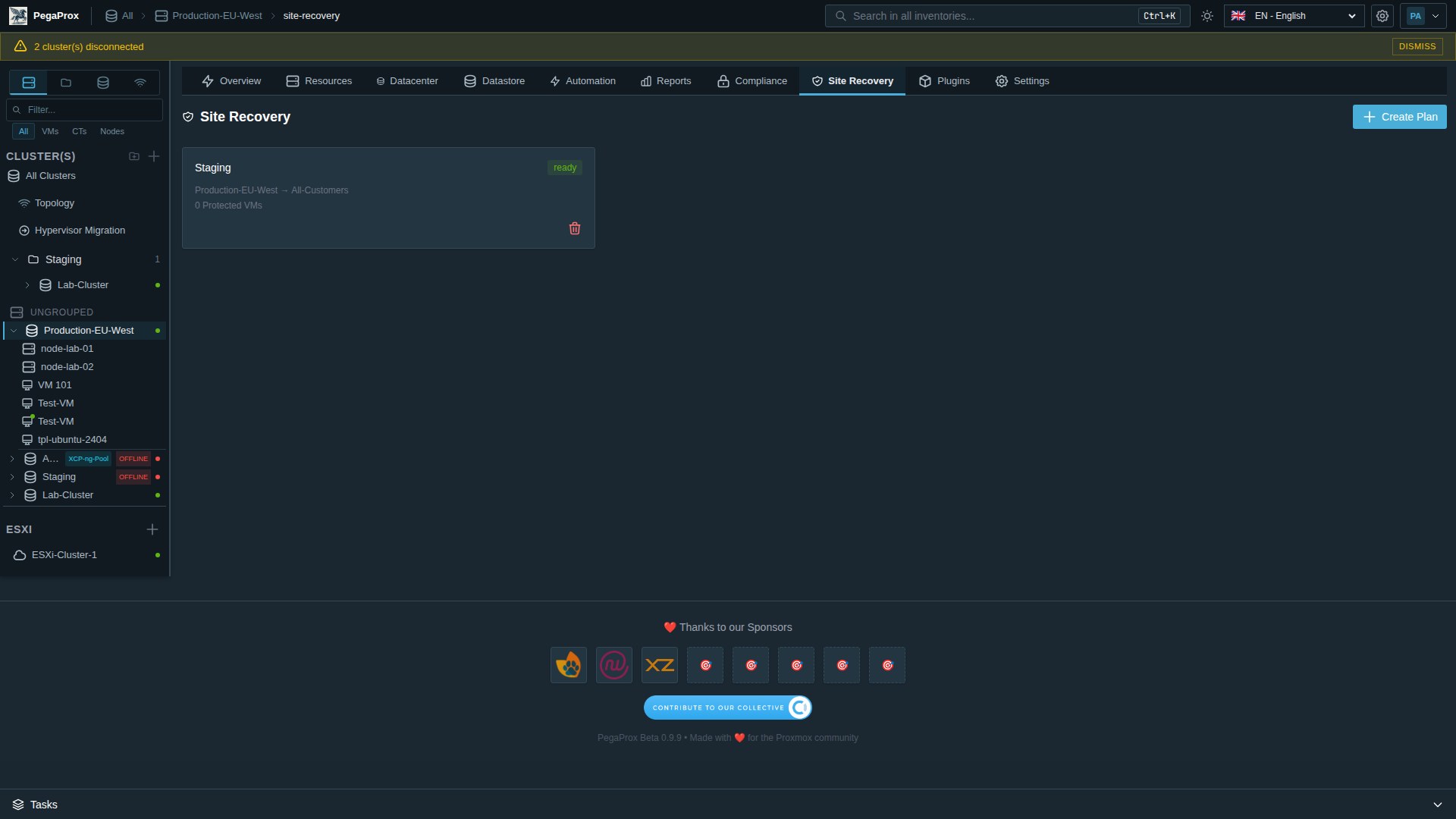
Documented DR drills

Site Recovery plans with explicit boot order, dependencies, replication mappings and execution audit trail. Test failovers in a controlled way and produce evidence that you did.

Cost & carbon visibility

€/VM/Month from real metrics. Top-spender table for your finance team. CO₂ tracking per VM with grid intensity from your region. PDF & CSV export — chargeback ready.

Identity that fits your existing stack

Active Directory, OpenLDAP, Entra ID, Keycloak, Google Workspace, Authentik. PKCE OIDC. WebAuthn / FIDO2. RBAC down to the individual VM. Multi-tenancy for service providers.

Self-hosted. No telemetry. Yours.

Runs on your own hardware. Air-gap mode for VS-NfD / classified networks disables external lookups entirely. AES-256-GCM encryption at rest. AGPL-3.0 source on GitHub.

One pane of glass for Proxmox and XCP-ng

Native XCP-ng / XAPI pool support sits next to your Proxmox clusters in the same sidebar. Lifecycle, console, snapshots, maintenance — same UI, same RBAC, same audit log.

Capabilities

Everything in one platform.

Six functional areas, one self-hosted install. Below: the headline list. Full reference in the docs.

Multi-cluster operations

Run dozens of Proxmox clusters from one pane of glass.
Unified dashboard
Every cluster, every node, every VM in one view.
Live metrics (SSE)
CPU, RAM, disk, network — push-based, no polling.
Live migration
One-click VM moves between nodes.
Cross-cluster load balancing
Distribute workloads across clusters automatically.
Cross-hypervisor migration
ESXi · Proxmox · XCP-ng — VMs flow between them.
XCP-ng integration
Pool support, lifecycle, console, maintenance mode.

Reports, analytics & FinOps

Numbers your CFO and your auditor agree on.
Cost dashboard / chargeback
€/VM/month from real metrics. CSV + PDF export.
Power & carbon tracking
kWh, €/month, kg CO₂/month — per VM, per cluster.
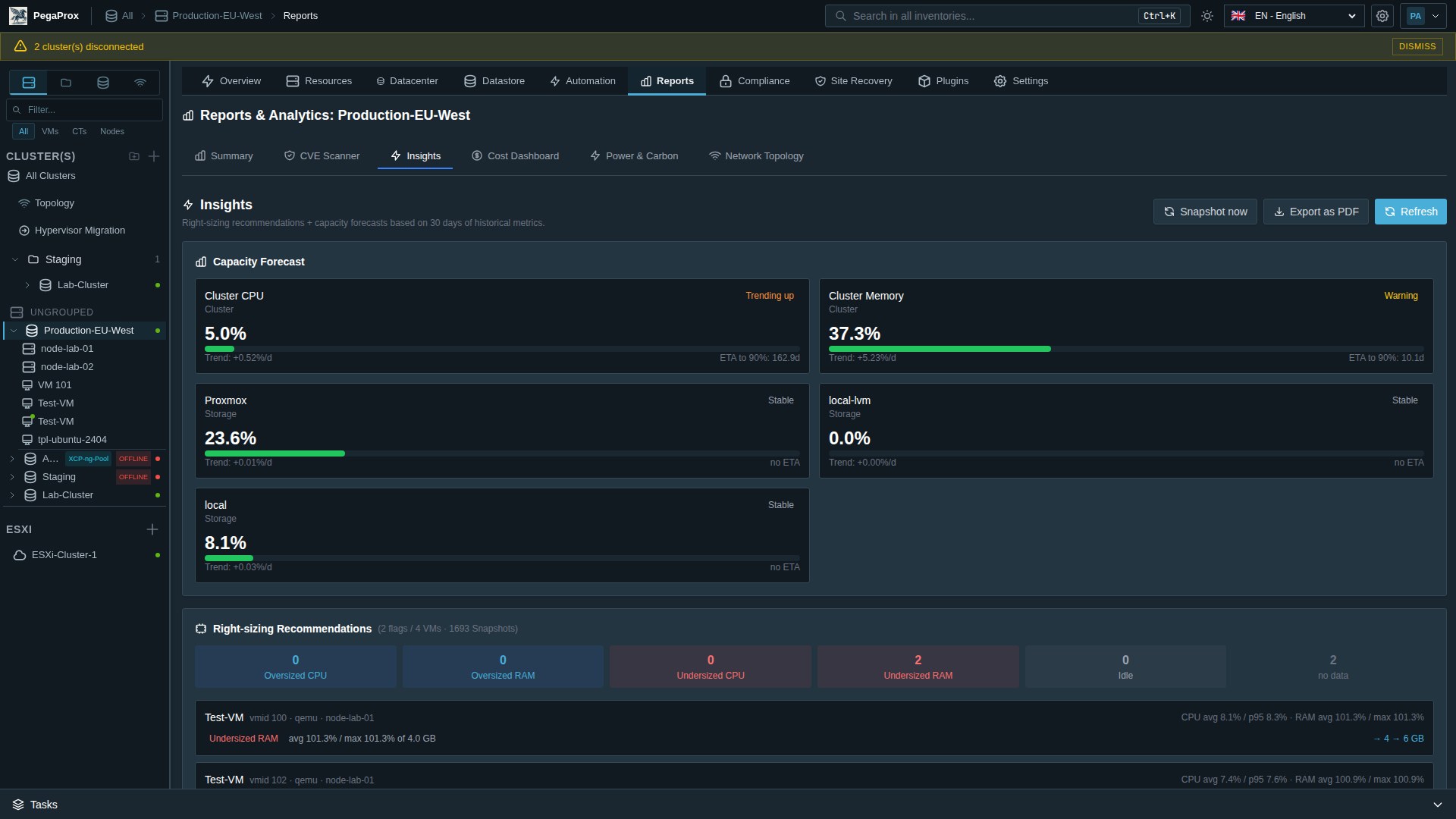
Insights & forecasts
Right-sizing recommendations, capacity ETA, idle VMs.
Network topology
Interactive cluster → bridge → SDN → VM graph.
Compliance dashboard
BSI · ISO 27001 · NIS2 · SOC 2 mapping. PDF export.
CVE reporting
Per-cluster severity counts. Historical view.

Operations & deployment

From cloud-init template to disaster-recovery drill.
Cloud-init library
Curated templates: Ubuntu, Debian, Alma, Rocky, Fedora.
Site recovery
DR plans with boot order, dependencies, audit trail.
DR drills
Test failovers without praying. Auditor-grade.
Backup SLA tracking
Last-backup age vs RPO. Alert pipeline integration.
ZFS / cross-cluster replication
Native PVE replication monitor + cross-cluster replication.
V2P / ESXi migration
Pyvmomi + SSHFS, VirtIO bulk-install for Windows.

Security & access control

RBAC down to the individual VM. Audit log a tampering attempt can't lie its way out of.
Multi-user RBAC
Admin, Operator, Viewer + custom roles. VM-level ACLs.
2FA · WebAuthn / FIDO2
YubiKey, Touch ID, Windows Hello. Passwordless option.
LDAP · OIDC · SAML
AD, Entra, Keycloak, Google, Authentik (PKCE).
Multi-tenancy
Isolate clusters per customer. ISP-grade.
AES-256-GCM at rest
Every stored credential encrypted on disk.
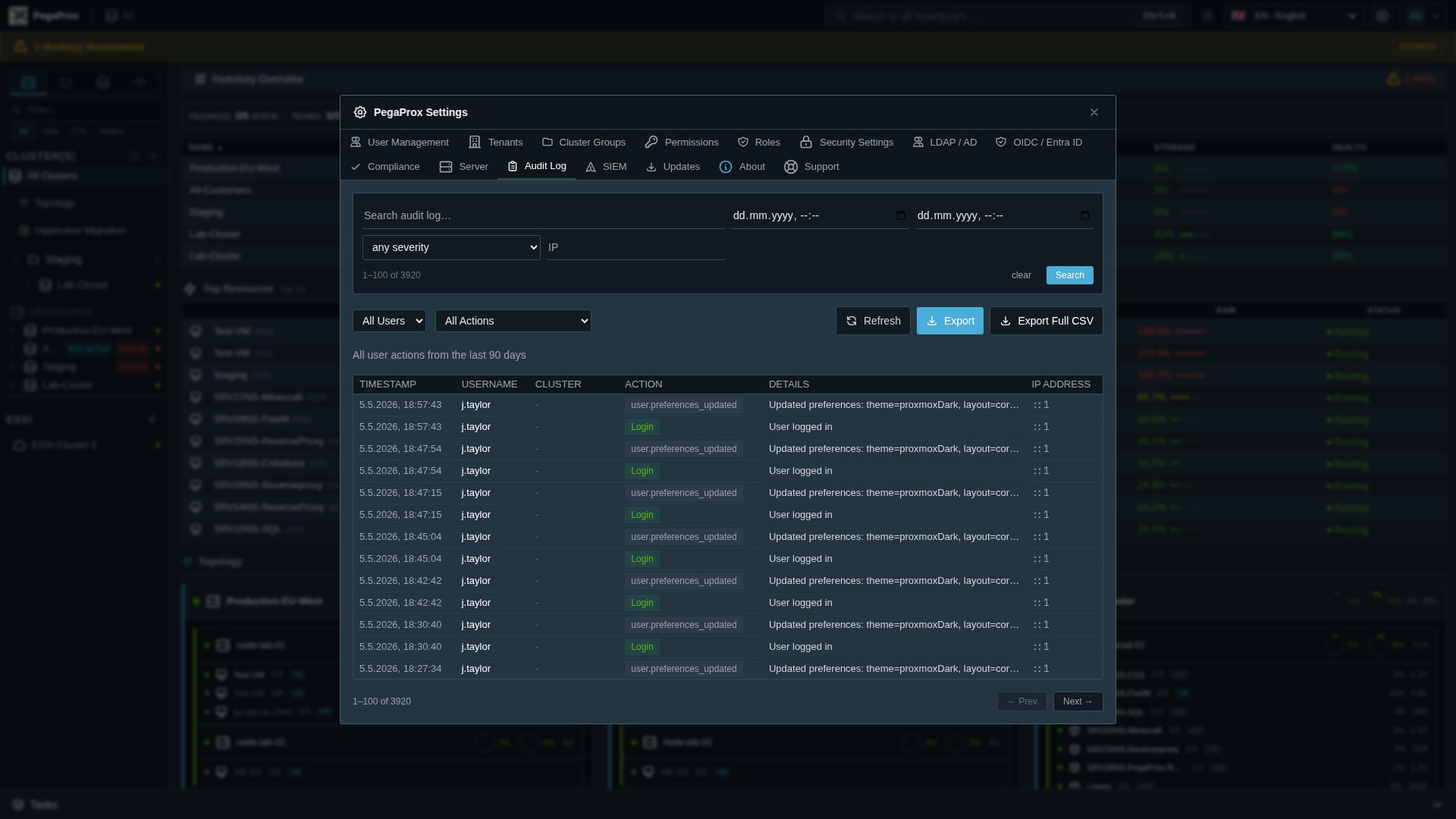
HMAC-signed audit log
Tamper-evident integrity check on every entry.

Automation & monitoring

Fewer pager alerts. More uptime.
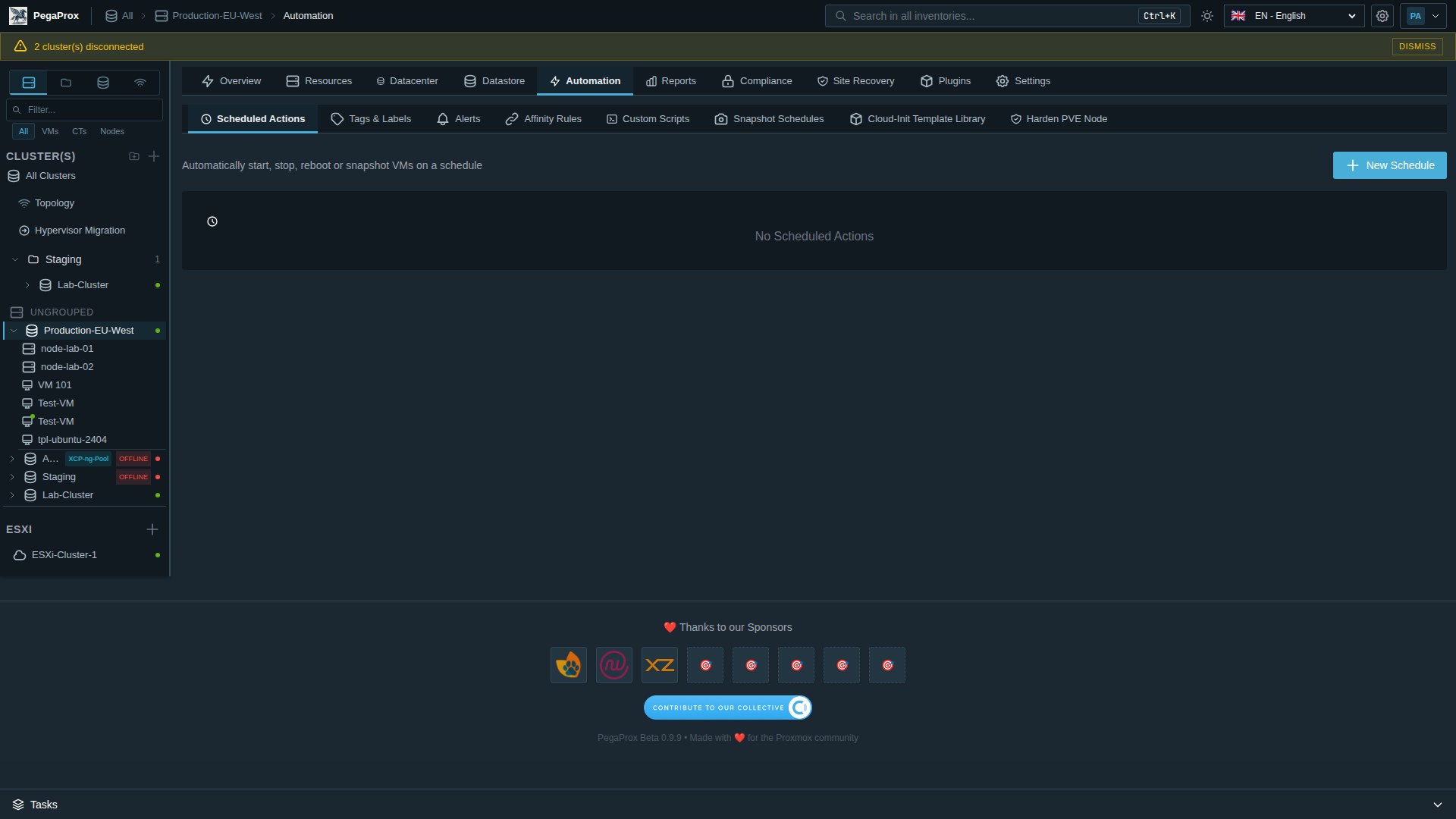
Scheduled tasks
Start, stop, snapshot, backup — on cron.
Snapshot schedules
Hourly · daily · weekly with retention pruning.
Rolling node updates
One node at a time, automatic evacuation.
Alerts
CPU, RAM, disk, latency — per-cluster thresholds.
Audit search
Full-text + date + severity + IP. CSV export.
SIEM forwarder
Syslog · Splunk HEC · Elasticsearch · Loki · webhook.

Communication & integrations

Plays well with the tools your team already uses.
Webhook channels
Slack · Discord · Teams · ntfy · generic JSON.
Web push (PWA)
VAPID-based, no payload leak to push provider.
Client portal plugin
Self-service for hosting customers. Power, console, snapshots.
Status page plugin
Public health page with URL-key auth. NOC-ready.
17 themes
Dracula, Nord, Solarized, Cyberpunk, Corporate light/dark.
7 languages
EN · DE · FR · ES · PT · KO · IT.
Honest comparison

PegaProx · vCenter · stock Proxmox UI.

No marketing slop. Where stock Proxmox does it equally well, we say so.

Capability PegaProx VMware vCenter Stock Proxmox UI
Multi-cluster single pane of glass✓ Native— per-cluster only
ESXi → Proxmox migration wizard✓ With VirtIO pre-staging— N/A⚠ qm importovf only
Cross-hypervisor (ESXi · PVE · XCP-ng)
Compliance dashboard (BSI · ISO · NIS2 · SOC 2)✓ Read-only, PDF export⚠ via Aria/3rd party
Cost / chargeback dashboard✓ Native⚠ Aria Operations (sep. license)
Power & carbon tracking✓ Native
Disaster-recovery drill execution✓ With audit trail✓ SRM (sep. license)
RBAC down to per-VM ACL
LDAP · OIDC · SAML · WebAuthn✓ All four⚠ LDAP only
Multi-tenancy for service providers⚠ vCloud Director
Self-hosted, no telemetry✓ AGPL-3.0— Closed source✓ AGPL-3.0
Annual cost for a 100-VM environment€0€10k+€0

Stock Proxmox VE is excellent. PegaProx adds the cross-cluster, compliance, and FinOps layer on top — without replacing it.

Get started

Download PegaProx

Get started with PegaProx in minutes. Choose your preferred installation method.

Deploy Script

The fastest way to get started. Run our deployment script on any Debian-based system.

curl -sSL https://raw.githubusercontent.com/PegaProx/project-pegaprox/refs/heads/main/deploy.sh | sudo bash

Pre-built Images

Download ready-to-use VM or Container images with PegaProx pre-installed.

VM Image

Full VM with PegaProx pre-installed

CT Template

Debian 13 LXC Container

Full install guide Documentation Releases
What's in a name

Pegasus, meet Proxmox.

The name PegaProx is inspired by Pegasus, the winged horse of Greek mythology, combined with Prox as a reference to Proxmox VE.

Pegasus symbolises speed, freedom and elegant flight — qualities we aspire to bring to multi-cluster hypervisor management.

PegaProx pegasus mark
The team

Three developers. One mission.

PegaProx is built by a small, focused team. We answer our own bug reports.

Nico Schmidt

Nico Schmidt

Lead Developer · Founder

Infrastructure enthusiast with a passion for automation and clean code. Drives the core architecture of PegaProx.

Marcus Kellermann

Marcus Kellermann

Backend Developer

Systems architect focused on building scalable and reliable backend services. Lives in the API layer.

Laura Weber

Laura Weber 🏳️‍⚧️

Frontend Developer

UI/UX specialist creating intuitive interfaces. Believes that powerful tools should also be beautiful.

🚀

We're looking for you

PegaProx is growing — we'd love to welcome a Developer and a Social Media Manager to the team. Passionate about Proxmox, open source and building something people genuinely enjoy? Let's talk.

Get in touch
Community contributors

Built with help from the open source community.

Code, docs, ideas, infrastructure — every PR matters.

gyptazy

gyptazy

Active Contributor

Creator of ProxLB and a steady supporter of PegaProx. gyptazy has shaped our load-balancing features, contributed the integrated syslog server (PR #257), the Prometheus exporter (PR #363), the template-indicator UI (PR #373) and provides infrastructure including download mirrors.

Plus dozens of other contributors on GitHub.

Engineering practice

Yes, we use AI. Here's how — and how we don't.

Three developers, big ambition. We use AI tools the same way we use linters and IDEs: as accelerators, not autopilots.

Built with AI-assisted development

Code generation, bug detection, doc drafting, test scaffolding — AI helps us move faster. Every line still goes through human review and gets tested before it ships.

Code generation Bug detection Documentation Testing

Vibecoding vs AI-assisted development

Vibecoding

You describe what you want, the AI generates the code, you accept the result as a black box without deep review. Quick — but you've handed over control.

Like telling a taxi driver "take me somewhere with good food" — you arrive, but you didn't choose the route.
AI-assisted development

AI suggests solutions and accelerates the workflow, but you remain the pilot — reviewing every line, owning every architectural decision.

Like a smart GPS that suggests routes — you're driving, you decide every turn.
The key difference

It's about responsibility and understanding. With vibecoding you accept the output as-is. With AI-assisted development you stay the engineer — making the architectural calls, owning the security review, vouching for what ships. We chose the latter because production software demands human oversight.

Human code review

Every change is read and understood by us before it merges.

Thorough testing

Every release goes through a test pass. No exceptions.

Architectural ownership

AI suggests. We decide. Always.

Full transparency

It's literally on our homepage. No hidden "AI magic."

Security transparency

Audited every day. Findings on the record.

PegaProx is open source and open about its security posture. Two independent scanners — Aikido and CodeAnt AI — sweep the codebase daily, and the results land in our backlog before the next release.

Two daily scanners. One public report.
Independent SAST · SCA · secrets · IaC · AI code review — run every day by Aikido and CodeAnt AI. The Aikido badge on the right is a live link to the current report.
SAST · static analysis Dependency vulnerabilities (SCA) Secret scanning IaC & deploy-script scan Open-source license compliance AI-assisted code review (CodeAnt AI) Vulnerability triage
What "transparent" actually means here

Findings from both Aikido and CodeAnt AI are triaged within 5 business days of detection. Critical and high-severity issues are patched before the next public release and then disclosed via GitHub Security Advisories — with a CVE where applicable and credit to whoever reported it. Lower-severity findings are tracked internally and resolved over the next one or two release cycles. We don't sit on vulnerabilities — we sit on the details just long enough to ship a fix safely. The aggregate posture (open / closed / severity buckets) stays on the public Aikido report linked above.

Open source code

The full codebase is AGPL-3.0 on GitHub. Auditors don't have to ask permission to read it.

Continuous SCA

Every commit on main triggers a fresh dependency + secret scan. Stale CVEs get flagged within a day, not a quarter.

Daily full sweep — two engines

Every 24 h, Aikido (SAST + IaC + secrets + SCA) and CodeAnt AI (AI-driven code review and security) scan the entire codebase, including mirror infrastructure and the deploy / update scripts. Two engines, two perspectives — fewer blind spots.

Public roadmap

Security work has its own track on the roadmap: see what's coming, what's in flight, what just shipped.

No telemetry

The software you run doesn't phone home. Update checks hit updates.pegaprox.com and that's it — no cluster identifiers, no usage stats.

Responsible disclosure

Found something? Mail us before posting — we'll credit you and ship the fix. See policy below.

Source: AGPL-3.0 public
Finances: Open Collective ledger
AI usage: disclosed (section above)
Security: daily Aikido + CodeAnt AI scan
Press & media

Writing about PegaProx? Help yourself.

Logos, brand colors, product screenshots and the press contact — all in one place. Use them freely; no permission required.

Brand assets

The PegaProx pegasus mark in transparent and square variants. Use the light-pegasus version on dark backgrounds and the dark-pegasus version on light surfaces. Don't recolor, rotate or stretch.

Press & support contact support@pegaprox.com · volunteer-run, typical reply within ~5 business days

Brand colors

The accent orange is the only saturated color in the system. Everything else is neutral.

Pega Orange
#E57000
Background
#0a0d12
Foreground
#f4f5f7
Typography Inter (Google Fonts). System UI font stack as fallback. JetBrains Mono for monospaced contexts.
Backed by

The companies that keep PegaProx alive.

PegaProx is community-driven and lives entirely from sponsorships and donations. Every euro keeps the lights on.

netwolk GmbH Expertize Netzware Occentus Network
SocialFurr
Become a sponsor   Open Collective